
I Stopped Using AI Chatbots.
Here's what my morning looks like now.
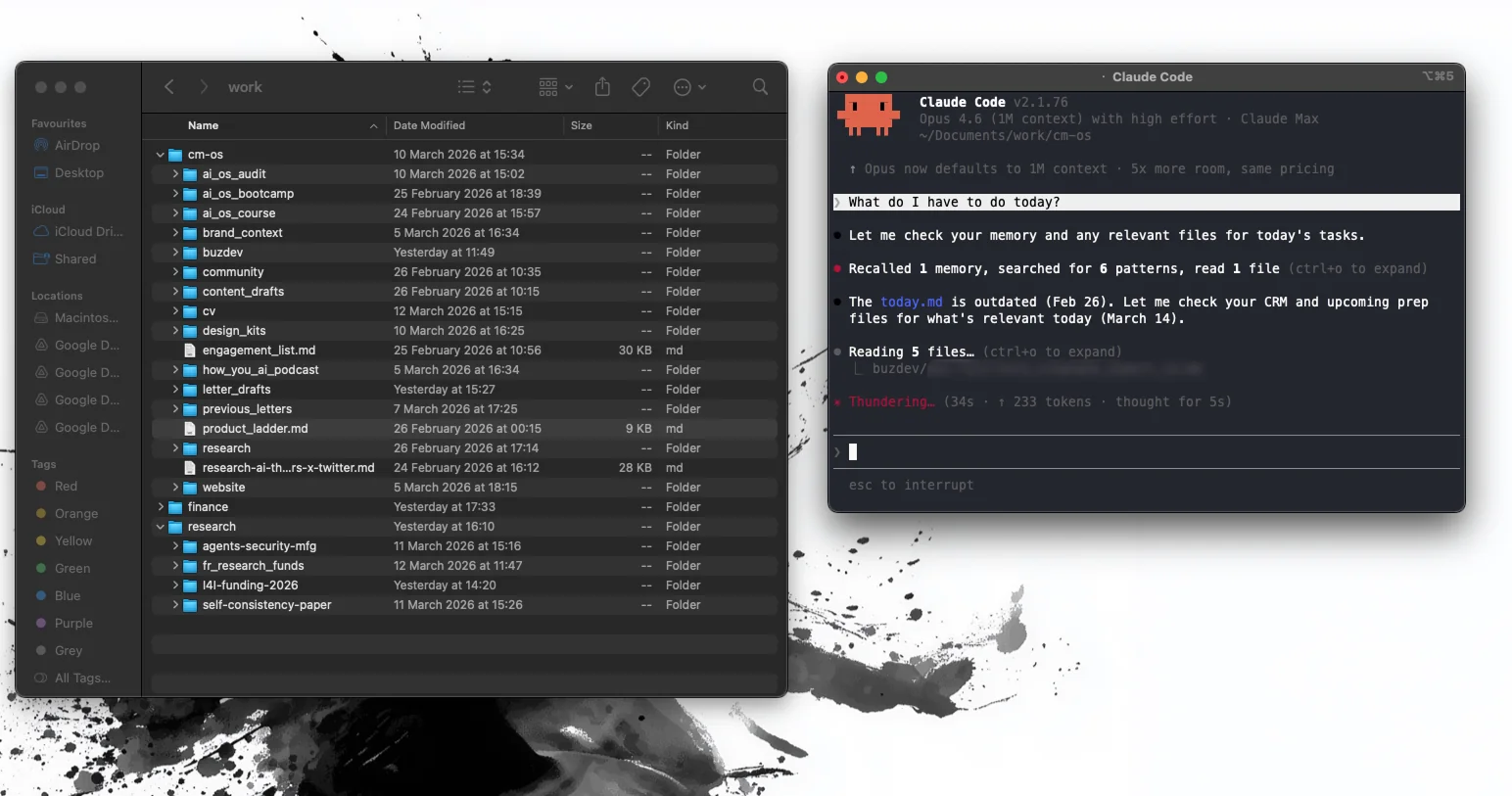
I wake up. Make coffee. Open my laptop. Navigate to a folder called "work."
I type: "What do I have to do today?"
And my AI agent gives me everything. Client follow-ups. Deadlines. That email I forgot to respond to on Monday. The proposal I need to finish by Thursday. Prioritized. Contextualized. Ready to go.
No app. No dashboard. No SaaS tool with 47 features I never use.
A folder. Some text files. And an AI agent sitting on top of it all.
That's it. That's my entire productivity system now.
I know how that sounds. Stay with me.
6 Weeks Ago, Something Shifted
I run an AI newsletter for 15,000 people. I've built 60+ AI systems for demadning companies like PwC. I teach professionals how to work with AI for a living.
And 6 weeks ago, I stopped using ChatGPT. Stopped using AI chatbots entirely.
Not because they're bad. Because I stumbled into something that made them feel like toys.
I started using an AI agent that lives on my computer. Not in a browser tab. Not behind a login. On my actual laptop, with access to my actual files. I happen to use one called Claude Code, but the specific tool isn't the point. The paradigm is the point. And the paradigm is this:
You create a folder for your project. Any project. You put your files inside: PDFs, spreadsheets, text documents, email threads, voice transcriptions, notes, whatever context you have. You can also build your library of prompt there. You point the agent at that folder. And you talk to it.
Not "give me a prompt and get a text response" talk. You tell it what you need done, and it does it.
It writes documents. Produces PDFs and docx files. Drafts emails in your voice. Builds web pages. Cleans data. Formats reports. Manages information. Compresses files. Creates actual deliverables that you can open, edit, and send to real people.
The first time I used it this way, I genuinely sat back in my chair.
This isn't a chatbot, it's a coworker.
The $99 Personal Assistant
Let me tell you what happened Tuesday morning. Because this is the part that keeps surprising me.
7:15 AM. Coffee in hand. I open my terminal, go to my work folder, and type:
"Good morning. What's my day look like?"
The agent scans my files. It knows my client/project/problems/tasks list (text files). It knows my deadlines (text file). It knows what happened yesterday (because the conversation history is right there in the folder).
It comes back with:
- Sophie sent a follow-up about the March proposal. Needs a response today.
- Newsletter draft is 80% done. Deadline is tomorrow.
- Three LinkedIn messages flagged for follow-up this week.
- Bootcamp session to prep for Thursday.
- You have an important call with Benoît today, do you want a prep file?
- The B proposal has been pushed twice already. Might be time to just finish it.
That last one. The agent noticed I'd been moving the same task for days. And it called me out.
I said: "Draft a reply to Sophie. Keep it warm but direct. Mention the March timeline and ask about her team's availability next week."
Few minutes later, I had a draft. In my tone. With the right context. Because the agent had read our previous exchanges sitting right there in Sophie's folder.
I reviewed it. Changed, edited. Sent it.
That whole interaction, from "good morning" to email sent, took about 4 minutes. On a normal day, that same email would have cost me 15-20 minutes of re-reading the thread, switching context, drafting, second-guessing the tone, editing.
And that's just the first 4 minutes of my day.
My "personal assistant" is a folder full of text files with an AI agent on top.
"But I'm Not a Developer"
I hear this every time I bring it up. And I get it. The tool runs in a terminal. It has "Code" in the name. It looks technical.
But the terminal is just a text box. You type English. It responds in English. That's it.
Yes, it can write code. But that's like saying a Swiss army knife is "a corkscrew." Sure, it has one. Not why I carry it.
And this isn't just my weird experience. At the last Claude Code hackathon, three of the five winners weren't developers. A cardiologist. An attorney. A road systems worker. They beat hundreds of software engineers. Because the bottleneck was never technical ability. It was knowing what to ask for and having the judgment to evaluate the output.
I've used it to:
- Analyze a 200-page PDF and pull out the 12 points relevant to my client
- Turn rough voice notes into structured meeting recaps
- Build a webinar landing page from a brief I wrote in plain English
- Generate a weekly social media plan based on my newsletter drafts
- Clean up a messy CSV of 500 contacts
- Draft consulting proposals tailored to each client's specific situation
None of that required code. All of it required me to know what I wanted and be able to judge whether the output was good.
That's a very important distinction. Remember it. We'll come back to it.
The Folder That Killed My SaaS Stack
This is the part that keeps growing in my head. And I want to be careful because I'm not an AI hype person. I've spent the last year in this newsletter telling you to be skeptical, to verify things, to not believe the pitch deck.
But I think what I'm experiencing right now is the beginning of something most people won't understand for another 12-18 months.
For years, we've been trained to think about work in terms of tools. Need a CRM? Buy one. Project management? Subscribe to Asana or Monday or Notion. Document drafting? Google Docs. Every problem had a SaaS subscription attached to it.
I had 11 active subscriptions at one point. Eleven. Some of them I only used for one feature.
Now my system looks like this:
One folder on my laptop. Subfolders for each area of work. Text files, documents, PDFs, notes, data inside them. One AI agent that can see everything, understand context, and do actual work.
My "CRM" is a markdown file. Contacts, context, last interactions, next steps. When I paste in a new email exchange, the agent updates the file. When I ask "who should I follow up with this week?", it knows.
My "project management tool" is a text file per project. Status, deadlines, blockers, notes. The agent reads them, reminds me what's due, flags what's slipping.
My "content calendar" is a folder with drafts and ideas. The agent helps me write, plan, and format.
Want to share it with your team? Put the folder on a shared drive. Done. That's your "collaboration tool."
And I keep looking at this setup thinking: what exactly was I paying all those SaaS companies for?
A pretty interface.
That's the answer. A structured, visual way to organize information that I can now put in a text file and operate through an agent that actually understands what's inside.
And I don't think I'm the only one figuring this out.
This Is Bigger Than My Laptop
A few weeks ago in this newsletter, I wrote about $285 billion being wiped from SaaS stocks in what Wall Street is now calling the "SaaSpocalypse." Atlassian dropped 35% after enterprise seat counts declined for the first time in the company's history. Salesforce fell 28%. Publicis Sapient started cutting SaaS licenses by 50%.
When I wrote that letter, I was analyzing it from the outside. Enterprise trends. Market data. Macro shifts.
Now I'm living it. From my laptop. With a folder and a subscription.
And here's what I think most people are missing:
A SaaS tool is really just a pretty interface sitting on top of your data. Notion is a fancy way to organize text. A CRM is a fancy way to organize contacts. A project management tool is a fancy way to organize tasks.
When you have an AI agent that can read any file, understand any structure, and produce any output, the fancy interface becomes optional. Expensive optional.
A SaaS tool makes you conform to its workflow. An agent conforms to yours.
That's the part that hits different when you experience it. The CRM forced me to click through 6 screens to log a client note. The agent just reads my pasted email and updates the file. The project management tool needed me to manually drag cards between columns. The agent reads my updates and knows what moved.
Meanwhile, most people are still debating which chatbot is better. ChatGPT or Claude or Gemini. Comparing model specs like phone reviews. More tokens. Bigger context window. Better benchmarks.
That conversation is already outdated.
The shift is from "AI as a tool you visit in a browser" to "AI as an agent that lives in your environment and does your work." From asking questions to delegating tasks. From a chatbot to a collaborator.
And most people don't even know it's happening.
The Catch
You knew this was coming. I'm not a hype guy and I never will be.
The agent is fast. Scary fast. It'll draft that email in 30 seconds. Analyze a 200-page document in two minutes. Generate a proposal that looks polished and professional and ready to send.
And sometimes it's wrong.
Not obviously wrong. Subtly wrong. The kind where the tone is slightly off, or it made an assumption about a client's timeline that isn't verified, or it pulled a number from an outdated file and presented it with full confidence.
Because that's what it always does. Full confidence. Same tone, same polish, same professionalism whether it's right or wrong. No hesitation. No "I'm not sure about this one." I wrote an entire letter about this a few weeks ago. AI never says "I don't know." That hasn't changed. And in some ways it matters even more now, because when the agent touches your files, your emails, your client work, the surface area for subtle mistakes gets enormous.
So here's the truth that nobody wants to hear:
The only skill that actually matters in this new world is knowing what to check and building a SYSTEM around your work.
Not prompting. Not "prompt engineering."
How do you structure your context? How do you check your work? How do you collaborate properly with an agent? Can you read what the agent drafted and tell, from your own expertise, whether it's right? Can you catch the email that sounds perfect but makes a commitment you didn't authorize? Can you spot the numbers that look clean but come from last quarter's data?
You have to sign your name on everything this agent produces. Every email. Every proposal. Every report. And signing your name means you understand it, you trust it, and you'd defend it if someone called you on it.
That's the real bottleneck. Not the AI. Not the setup. Not the technology.
You.
Your judgment. Your expertise. Your ability to tell good output from plausible garbage.
This is what I've been writing about for 73 issues of this newsletter. It's never been more true than right now:
AI is only as good as the human operating it.
So What Does This Mean for You?
I think we're at the start of the biggest shift in how knowledge work gets done since the spreadsheet. And I say that as someone who's been deliberately allergic to grand claims.
But this is my Tuesday morning. This is real. This is me, opening a folder, talking to an agent, and getting actual work done in a fraction of the time. Every day. For 6 weeks. And it keeps getting better because the more context I put in the folders, the more the agent understands how I work.
If you're still using AI by opening a browser tab, typing a question, and copying the response into a document, that’s a good start. Build a simple system around that. You need to have a system first.
But you probably need to prepare for the agent shift. Install Claude Code (or any other similar tool) today, and try it on a couple of tasks. Fail, then retry and see what happens.
The paradigm I see for the next couple of years (months?) is this: a folder with the right context, plus an agent that can read and act on it, replaces most of your tool stack.
I believe the people who figure this out first will have a massive advantage. Not because the technology is secret (it's not, it's available to everyone). But because the mindset shift is genuinely hard. Going from "AI user" to "AI operator" to "AI collaborator" requires you to understand your own work deeply enough to direct an intelligence that can do most of it.
I think that's the most exciting part of all of this.
Because it means the skill that matters most isn't technical. It's human. It's knowing your domain. Trusting your judgment. Being willing to own the output.
The people who have that are about to move very, very fast.
Everyone else is still comparing chatbots.
See you next week.
— Charafeddine (CM)