
Articles & Playbooks
How to turn ChatGPT into your sharpest teammate in under 5 minutes a day.
We’ve all had that moment.
It’s 10:42 p.m. You finally sit down to “just quickly” get something out of ChatGPT.
You: “Write a clear SWOT analysis of our top competitor.”
AI: kind of does it
You: “Okay, now make it more concise.”
AI: swings too hard, now it’s vague
You: “Fine, add more detail, but also structure it, and maybe give actions.”
Twenty prompts later, you have what you wanted… but you’re also mildly questioning your life choices.
The problem usually isn’t the AI.
It’s the way we talk to it.
In this post, we’re going to fix that.
We’ll walk through four practical techniques we use every day to make AI feel less like a moody intern and more like a sharp, proactive teammate:
- Prompt Reversal – turn messy back-and-forth into one killer reusable prompt
- The 5-Minute Amplifier – squeeze 10 assets out of one great input
- The Red Team Technique – get the AI to attack and improve your own work
- Blueprint Scaffolding – force clearer thinking before the AI generates anything
We’ll keep it concrete, a bit funny, and totally focused on making your workday easier.
Why Most AI Conversations Feel Like Ping-Pong
Let’s be honest: most of us use AI like this:
- Throw in a vague prompt.
- Get a “meh” answer.
- Nudge it.
- Nudge it again.
- Repeat until your soul leaves your body.
That’s because you’re doing the thinking and refining in your head, and only drip-feeding instructions to the AI.
These four techniques flip that around:
- We capture the good stuff we discover through back-and-forth.
- We reuse it as clean, powerful prompts.
- We force the AI to think in public so we can edit its thought process.
Let’s go one by one.
1. Prompt Reversal Technique: Steal Your Future Self’s Perfect Prompt
We start with our favorite: Prompt Reversal.
The problem it solves
You know that dance:
- First answer: ~50% of what we wanted
- Second answer: 60–70%
- After several tweaks: finally 90%
- Then… we move on and throw away the best prompt we ever “designed”.
Prompt Reversal is how we stop wasting that learning.
Instead of treating the final answer as “done,” we treat it as training data for a perfect future prompt.
A real example: dissecting a competitor
Imagine we ask ChatGPT:
“Analyze our main competitor, Anthropic, and walk us through their business strategy.”
We get a long, fairly impressive wall of text.
The problem? It’s way too dense. We’re not sure what to focus on.
So we refine:
“This is too dense. Restructure this into a SWOT analysis: strengths, weaknesses, opportunities, threats.
- Use three bullet points per section
- Use clear, simple language”
Now we get a clean SWOT.
But now it’s too concise. The bullets lack detail and we want concrete actions.
So we refine again:
“This is now too concise. Flesh out each bullet point and add a subheading under each section called ‘Our Strategic Response’ with one concrete action we can take.”
Finally, we get exactly what we want:
- Strengths
- 3 detailed bullets
- “Our Strategic Response” with a specific move
- Weaknesses
- 3 detailed bullets
- “Our Strategic Response”
- Same for Opportunities and Threats
This is the moment most people just say, “Nice,” copy some bits, and close the tab.
This is where we do something different.
The magic line: “Reverse engineer our conversation”
We add one last prompt:
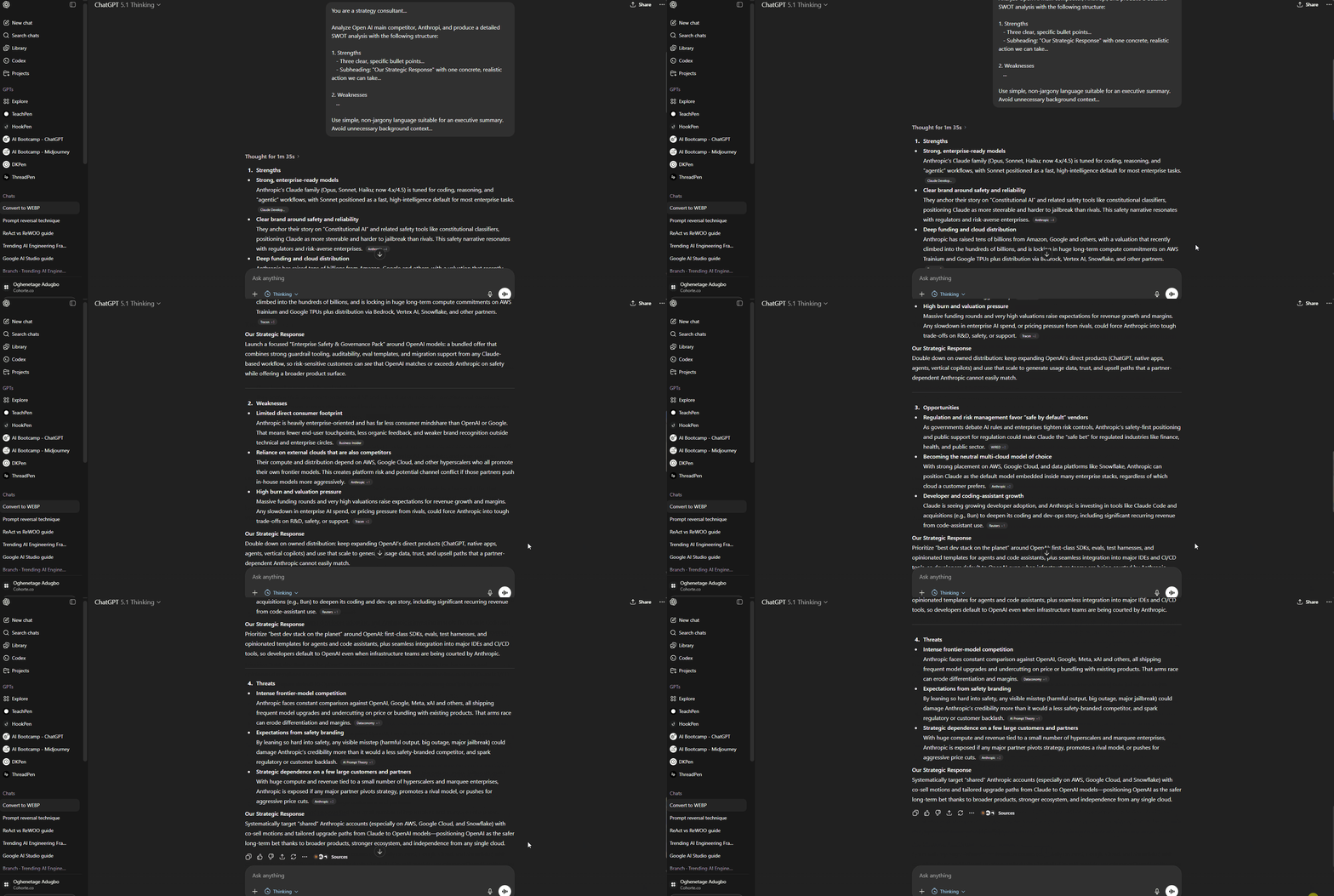
“Reverse engineer our conversation and write one single prompt that would have produced this final response in one go.
- Include the structure (SWOT)
- The tone (clear, simple language)
- The ‘Our Strategic Response’ section and action items
Put your answer in a code block so it’s easy to copy.”
The AI responds with something like:
You are a strategy consultant...

Analyze [COMPANY]’s main competitor, [COMPETITOR], and produce a detailed SWOT analysis with the following structure:

1. Strengths
   - Three clear, specific bullet points...
   - Subheading: "Our Strategic Response" with one concrete, realistic action we can take...

2. Weaknesses
   ...

Use simple, non-jargony language suitable for an executive summary. Avoid unnecessary background context...
Now we:
- Copy that prompt
- Open a new chat
- Paste it in, swap in any competitor name we want
- Hit enter
We get the near-perfect result in one step.
Why this is so powerful
Over time, Prompt Reversal:
- Saves hours of back-and-forth
- Captures tiny refinements we’d otherwise forget
- Teaches us how “optimized” prompts are actually structured
- Builds a prompt library that truly reflects how we work
Most of the prompts we save to our Notion database come from this technique.
The prompts that survive real-world use? Those are worth keeping.
Pro tip: Treat prompts like internal tooling
We’re huge fans of prompt databases for teams.
One practice we like (inspired by a HubSpot ebook we genuinely rate):
Assign a single “prompt gatekeeper” per team.
That person:
- Adds the best prompts (from prompt reversal)
- Cleans up duplicates
- Removes outdated templates
- Keeps everything tagged by use case: “competitor analysis,” “board updates,” “launch emails,” etc.
It’s like version control, but for prompts instead of code.
2. The 5-Minute Amplifier: Turn One Asset into a Content Factory
Next up: The 5-Minute Amplifier.
The idea is simple:
Take one high-effort piece of work
→ Feed it to AI
→ Ask it to spin off multiple useful formats in minutes
Instead of begging for new inputs from busy colleagues, we make their one asset do all the heavy lifting.
The “Where are those slides?” problem
Us: “Hey, you’re going to send us those slides tomorrow, right?”
Sales/Product: “Oh yeah, for sure. Promise.”
A week later…
Us: “Yo, where are the slides?”
Sales: “So sorry. We were busy pitching clients and generating shareholder value, something you marketing folks wouldn’t understand.”
Us: “Cool cool cool. Love that for you.”
Jokes aside, we hit the same bottleneck every time:
- We needed content
- The content lived in someone else’s deck
- That someone else was busy doing their actual job
With AI, as soon as we get our hands on that main slide deck, everything changes.
How the 5-Minute Amplifier works (step-by-step)
Let’s say we finally get the deck from Sales.
We upload or paste the content into our AI tool and start firing off prompts:
- Audience quiz
“Create an engaging 10-question quiz based on these slides.
- Multiple choice questions
- Label the correct answer for each
- Use clear, non-technical language”
- Internal recap email
“Draft an internal recap email for stakeholders who couldn’t attend the event.
Summarize:
- Key takeaways
- Product updates
- Any decisions made or next steps
Keep it concise, skimmable, and executive-friendly.”
- Client-facing infographic
“From these slides, pull out the most impactful stats and turn them into copy for a one-page infographic.
- Short headline per stat
- 1–2 sentences of context
- Indicate suggested icons/visuals for each stat.”
Now we have:
- A quiz
- An internal summary
- A client follow-up asset
All from the same deck.
.gif)
This works across every department
Some examples:
Sales
- Turn an industry report into:
- Cold outreach email templates
- A LinkedIn post to generate leads
- A list of talking points for the next client call
HR
- Take a 1-hour webinar transcript and turn it into:
- A quick-reference guide with step-by-step instructions
- An FAQ for the internal knowledge base
- A short knowledge-check quiz for attendees
Ops / Product
- Take a release notes doc and convert it into:
- Customer-facing “What’s new” copy
- Internal enablement notes for Sales
- A draft internal training outline
Key principle: only amplify “pillar content”
Here’s the catch:
AI amplifies whatever you feed it.
Good in → great out.
Garbage in → slightly better garbage out.
We like to call the good stuff pillar content:
- A proven high-performing deck
- A detailed data report
- A webinar that got great feedback
- A doc someone already poured serious thought into
Be picky. Don’t ask AI to amplify a half-baked draft you don’t even like.
Pro tip: Build an “Amplifier Playlist”
To make this dead simple, we keep a reusable prompt like:
“You are a content amplifier. Given a single high-quality source (like slides, a report, or a transcript), generate:
- an internal recap,
- a client-facing asset, and
- an interactive element (quiz, checklist, or exercise).
Ask clarifying questions only if truly necessary.”
We reuse this prompt across teams and just change what formats we want.
3. The Red Team Technique: Let the AI Attack Your Work (So Others Don’t)
Third technique: Red Teaming.
This is where we weaponize the AI against… ourselves.
The idea comes in two moves:
- Ask AI to help you create something
- Immediately ask it to switch personas and aggressively critique what it just made
The goal: surface red flags before a hiring manager, CFO, or VP does.
Example 1: Job applications
Step 1 – Creation:
“Tailor this resume to the following job description.
- Highlight the most relevant experience
- Use concise, results-oriented bullet points.”
Step 2 – Red team:
“Now act as a hiring manager for this exact role.
You’re extremely busy and only have 60 seconds to scan the resume you just helped write.
- What are your immediate red flags?
- What would make you pass on this candidate?
Be blunt.”
Suddenly, it turns from helpful assistant into harsh gatekeeper:
- “This bullet is too generic.”
- “You mention ‘led a team’ without scope or results.”
- “There’s no clear evidence you’ve done X at the scale we need.”
Perfect. That’s the feedback we actually wish we had before we hit “Submit.”
Example 2: Business proposal for your CFO
Step 1 – Creation:
“Draft a business proposal to our CFO for investing in [initiative].
- Include cost estimates
- Expected ROI
- Timeline
- Risk considerations.”
Step 2 – Red team:
“You are now the company’s CFO.
Your primary goal is to cut unnecessary costs.
Read the proposal you just drafted and critique it.
- What is the biggest financial risk?
- Where is the ROI not justified enough?
- What would make you reject this instantly?”
You’ll get things like:
- “The payback period is unclear.”
- “Assumptions aren’t backed by benchmarks.”
- “You’re understating implementation risk.”
Exactly what we need to tighten.
Example 3: Cold outreach email
Step 1 – Creation:
“Write a cold outreach email to a VP of Marketing at a mid-size B2B company.
Keep it to 120 words, specific, and non-spammy.”
Step 2 – Red team:
“You are now that VP of Marketing.
You get 50 cold emails like this every day.
Read the email you just wrote and tell us your immediate, unfiltered reaction.
- Which specific sentences make you hit the delete button?
- Why?”
Suddenly we hear:
- “Subject line looks like generic sales spam.”
- “You talk too much about your company, not my problems.”
- “The CTA is vague.”
Good. That’s the stuff that actually kills response rates.
Pro tip #1: Make the persona painfully specific
Don’t just say “act as a critic.”
Say things like:
- “You are a risk-averse CTO whose main concern is data security and compliance.”
- “You are a time-poor CEO who only reads the first 3 sentences of any email.”
- “You are an HR lead who is allergic to corporate fluff and values clarity.”
The more specific you are about who they are and what they care about, the sharper the critique.
Pro tip #2: Turn critiques into a to-do list
After the AI has torn your work apart, close the loop:
“Based on the weaknesses you just identified, rewrite the three weakest sentences in the original [resume/proposal/email] and explain why your new version is stronger.”
You go from:
- Vague feeling that something’s off
→ To a concrete edit list
→ To improved copy in the same session
4. Blueprint Scaffolding: Make the AI Show Its Work First
Our fourth technique: Blueprint Scaffolding.
In plain terms:
Before the AI writes anything big or complex, we make it outline the structure and steps — then we edit that, then we let it generate the final thing.
It’s like reviewing the architectural blueprint before anyone pours concrete.
The “Workspace Academy” campaign problem
Imagine we run an online course called Workspace Academy and we want a marketing brief for a Q4 holiday promotion.
Most people send this:
“We offer an online course called Workspace Academy. Create a Q4 holiday marketing campaign brief.”
The AI gives us:
- Goals
- Channels
- UTMs
- Tracking
- Measurement
- Operations
- Roles
- Risks
- Mitigation
- …and a partridge in a pear tree
Is it wrong? Not really.
Is it useful right now? Also not really.
We don’t need all that on the first pass.
Step 1: Ask for the blueprint, not the building
We upgrade our prompt:
“We offer an online course called Workspace Academy. We need a marketing campaign brief for our Q4 holiday promotion.
First, outline the standard sections of a professional campaign brief and give us a one-sentence description for each section.
Don’t write the full brief yet. Just show the structure.”
Now we get something like:
- Objectives – one sentence
- Target audience – one sentence
- Key messages – one sentence
- Channels and tactics – one sentence
- Budget – one sentence
- Timeline – one sentence
- Measurement and KPIs – one sentence
- Risks and mitigation – one sentence
- Operations and roles – one sentence
- Etc.
.gif)
Instantly, we can see: this is too much for what we need today.
Step 2: Apply the 80/20 rule to the blueprint
We respond:
“Good. Now apply the 80/20 rule.
For a simple email marketing campaign with a 3-email sequence, keep only the essential sections and remove the rest. Update the outline.”
The AI trims it down to something like:
- Objectives
- Target audience
- Offer and positioning
- Email sequence overview (3 emails)
- Key messages per email
- Measurement and KPIs
.gif)
That’s suddenly… reasonable.
We might go one step further:
“Remove anything that’s not directly related to planning and writing the 3 emails. We don’t need detailed ops or risk sections in this brief.”
Now we’re left with the true core.
Step 3: Only then generate the full brief
When we’re happy with the blueprint, we say:
“Great. Now flesh out each of these sections in detail, using Workspace Academy as the product and Q4 holiday campaign as the context.”
Now the AI builds exactly the house we want, using the blueprint we just approved.
.gif)
The end result is more targeted, and we skip 3–4 rounds of vague “This is too generic” feedback.
Why this technique plays nicely with smarter models
In previous deep dives on more advanced models (like GPT-5–style “reasoner” updates), one pattern keeps showing up:
When you force the AI to show its steps, it tends to route itself through a more powerful reasoning process.
Blueprint Scaffolding does exactly that:
- Step 1: Planning / structure
- Step 2: Human review
- Step 3: Controlled execution
Less “AI magic,” more collaborative thinking.
Pro tip: Add success metrics to each step
We can go one level deeper and make the blueprint self-accountable.
For example:
“We need a social media campaign brief.
- First outline the steps in the process
- For each step, define a clear success metric
Example: For competitor analysis, success = ‘One-page report with three actionable takeaways.’
Don’t write the full brief yet.”
We now get something like:
- Step: Define objectives
- Success: 2–3 measurable goals agreed by stakeholders
- Step: Audience research
- Success: One-page summary with 3 core insights
- Step: Competitor analysis
- Success: One-page report with 3 actionable takeaways
- Step: Content plan
- Success: Calendar with X posts, themes, and draft hooks
When you finally ask it to execute, the model already knows what “done” looks like at each stage.
Where to Go From Here
Let’s recap the four techniques, so you can actually plug them into your workflow:
- Prompt Reversal
- Use normal back-and-forth to shape the perfect answer
- Then ask AI to reverse engineer that conversation into one reusable super-prompt
- Save that prompt to your team’s library
- The 5-Minute Amplifier
- Feed AI one piece of pillar content (deck, report, transcript)
- Spin it into multiple outputs: recap, client asset, quiz, social post, talking points
- Stop waiting for 5 people to send you 5 things
- The Red Team Technique
- Have AI create something with you (resume, proposal, email, brief)
- Immediately flip it into a hostile persona and ask it to attack what it wrote
- Turn that critique into specific edits
- Blueprint Scaffolding
- For complex work, ask for the outline/steps first
- Edit the blueprint
- Only then let the AI write the full output
- Optionally add success metrics to each step
You don’t need more random “120 prompts for productivity” lists.
You need a small set of reliable systems you can run over and over:
- To think more clearly
- To get better output faster
- To make AI feel like an actual teammate instead of a stubborn autocomplete
Use these four techniques for a week and you’ll start noticing a shift:
- Less “Ugh, I’ll just do it myself”
- More “Wait, AI can actually handle this if we set it up right”
And that’s the whole point.
We’re not trying to worship the tools.
We’re trying to ship better work with less pain.
— Cohorte Intelligence
December 5, 2025.